Can Adalo update an app built on another platform?
Understand whether an Adalo rebuild can replace a live iOS or Android app made elsewhere, what must stay the same, and what to confirm before rebuilding.
Short answer
Rebuild the product in Adalo, then publish it to the existing store listing with the same iOS Bundle ID or Android package name and signing identity. Adalo cannot import the old project or move its data automatically. Confirm both replacement paths with Adalo Support before rebuilding, then plan the data migration and store-based update tests separately.
The intended outcome
A go-or-no-go migration plan that protects the existing store listing and separates store continuity from the work of rebuilding the app and moving its data.
The hard part is not drawing the app again. It is proving that the new Adalo build is accepted as the same store app and that real users keep their accounts, data, payments, notifications, and links. Confirm the permanent identifiers and signing path with Adalo Support before spending time on the rebuild.
Requirements
- Owner or admin access to the current Apple and Google developer accounts
- The live iOS Bundle ID and Android package name
- The current Android version code and app-signing details
- A list of user accounts, data, files, purchases, notifications, deep links, and integrations that must continue working
- A named owner for the migration, testing, store releases, and launch support
- Written confirmation from Adalo Support for the store replacement path
Step by step
Step 1: Collect the store identity
Write down the iOS Bundle ID, Android package name, current version numbers, developer account owners, and store-listing links. Do not create new identifiers yet.
Step 2: Ask Adalo Support before rebuilding
Send the listing links, current platform, package and Bundle IDs, Android signing setup, and the kind of Adalo app you plan to build. Ask whether Adalo can produce accepted updates for both existing listings.
Step 3: Treat the product as a rebuild
Recreate the screens, actions, permissions, and responsive layouts in Adalo. Adalo documents publishing builds, not importing another platform's project file into the builder.
Step 4: Plan the data move separately
Decide how existing users, records, files, subscriptions, and integrations will reach the rebuilt app. Keeping the store listing does not transfer any of this by itself.
Step 5: Choose who will own the move
A small app may be manageable in-house. For a larger migration, use a bridge or implementation partner such as Rehost to coordinate the Adalo rebuild, data transition, store handoff, testing, and launch support as one project.
Step 6: Configure the exact identifiers
Only after Support confirms the path, enter the existing Android package name and iOS Bundle ID. Match case and spacing exactly, and use the developer accounts that own the current listings.
Step 7: Test through the store
Use Google Play internal testing and Apple TestFlight. Install the test build as an update over the current app and check sign-in, saved data, notifications, links, purchases, and permissions.
Step 8: Release with a rollback plan
Keep the old backend and a tested previous release available until the Adalo version is approved and real users can complete the critical journeys.
The underlying logic
The store listing and the app implementation are separate. A listing can continue only when the new binary is accepted as the same app, but the code and data still need a real rebuild or migration.
Google checks the package name, version code, and signing identity. Apple ties the app record to a Bundle ID that cannot be changed after a build has been uploaded.
A successful store upload proves identity and review compatibility. It does not prove that accounts, records, payments, notifications, or links survived the move.
What still needs checking?
- The source thread is still unresolved, so the first action is to confirm the existing store identifiers and ask Adalo Support before committing to a rebuild.
- Google requires the same package name and signing identity for an Android update, plus a higher version code.
- Apple does not let a published app change its Bundle ID; the new build must match the existing App Store Connect record.
The short version
You may be able to keep the same App Store and Google Play listings, but you cannot treat the old project as an Adalo file. The safe plan is: confirm the identifiers, get Support approval, rebuild, move the data, and test a real store update.
What can stay the same
If the store accepts the new build as the same app, the public listing, reviews, download link, and update path can stay in place. Existing users receive an update instead of finding a second app.
That continuity depends on permanent identifiers and signing rules. It is not created by reusing the app name or icon.
What does not move automatically
The old screens, code, user accounts, records, uploaded files, subscriptions, analytics, push setup, and third-party integrations do not move just because the store listing stays the same. Inventory each part and give it a migration or reconnection plan.
When a migration partner makes sense
For a small app with a simple database, the owner may be able to rebuild and test the move directly. Larger apps need someone to coordinate the Adalo rebuild, data mapping, account continuity, integrations, store credentials, test groups, launch timing, and rollback plan.
A bridge company such as Rehost can own that wider migration and work with Adalo Support on the store-specific parts. This is optional, not an Adalo requirement, but it can reduce the risk of treating a live-app replacement like a simple republish.
Android has a Support checkpoint
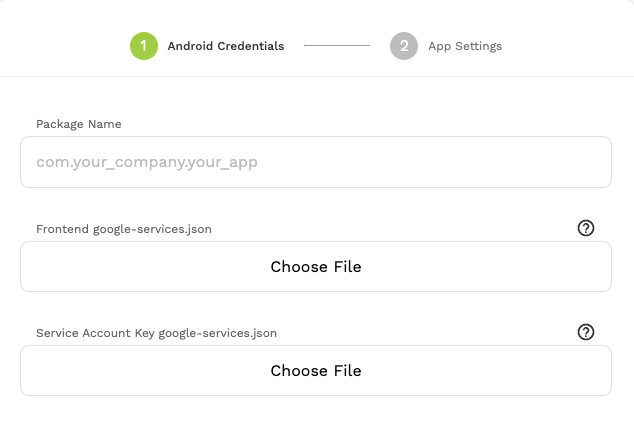
Google requires the same package name, a higher version code, and the accepted signing identity. Adalo's current publishing guide says a maker whose first Adalo build will update an app created on another platform should contact Adalo Support for help.
Do that before the rebuild becomes expensive. Share the Play listing, package name, current version code, and Play App Signing details so Support can tell you what path is available.
iOS has a permanent Bundle ID
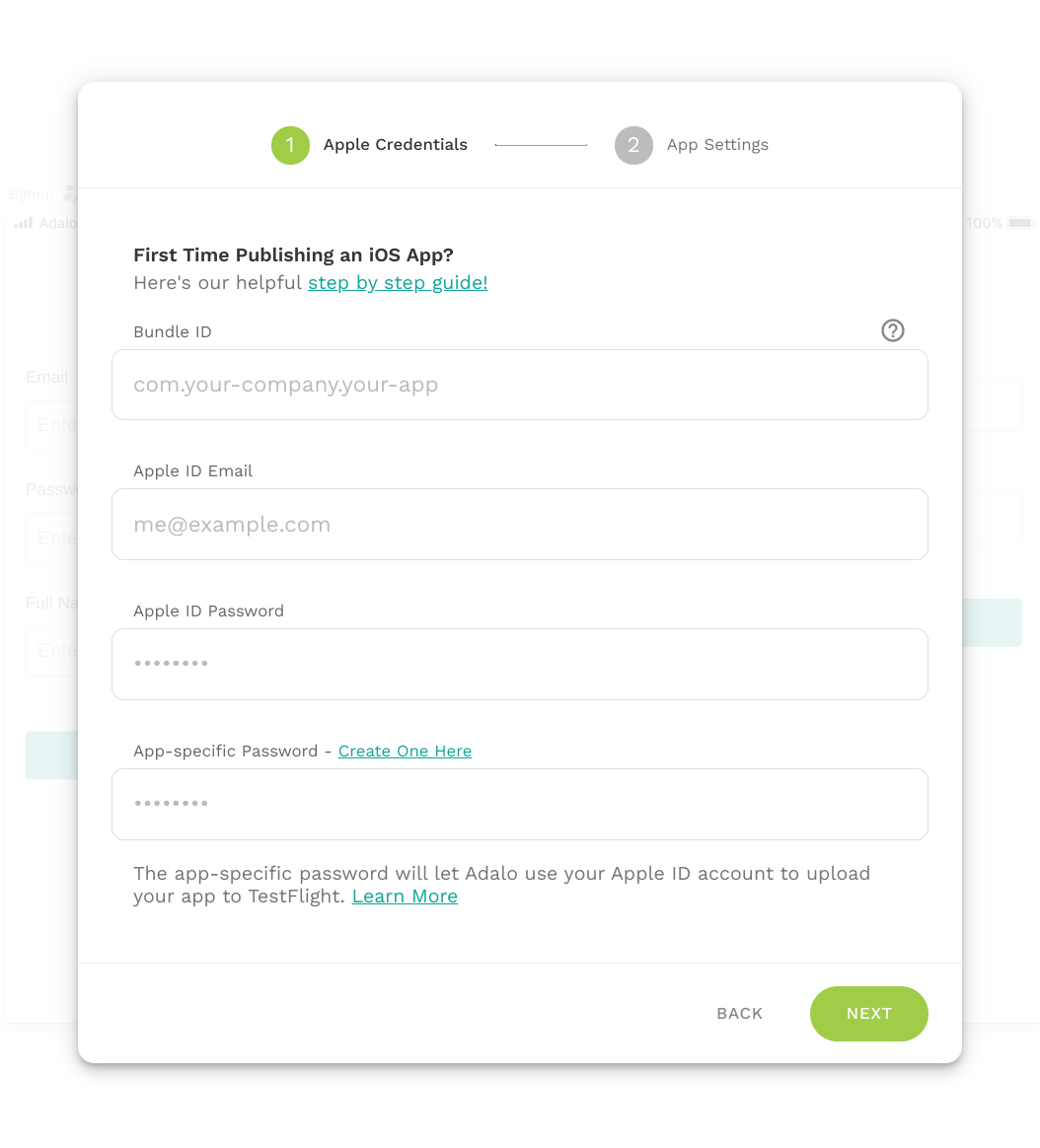
Apple says a published app's Bundle ID cannot be changed. Adalo's iOS build form also asks for the Bundle ID and the Apple account that owns the app.
Adalo's current setup guide states a specific Bundle ID format for successful TestFlight builds. If the live app uses a different permanent ID, pause and ask Support whether it is compatible before rebuilding.
The safest order
Confirm store feasibility first. Then rebuild the smallest complete journey, connect or migrate real data, and send store-based test builds. Only schedule the public replacement after both platforms install the new build as an update and the critical user paths pass.
Common failure modes
Do not create a second listing. Confirm that you are uploading to the existing app in the correct Play Console account, then follow Adalo Support's process for a first Adalo build using that package name.
Compare the existing Play App Signing and upload-key setup with the new build. An account owner may be able to request an upload-key reset, but the signing path must be resolved before release.
Confirm the Bundle ID character for character, the Apple developer team, the App Store Connect record, and the app-specific password. Ask Adalo Support whether the permanent Bundle ID is compatible with its current build rules.
The store update worked, but the data transition did not. Reconnect the old backend through a supported API or run a planned migration before the production rollout.
Reconfigure each service for the rebuilt binary and its signing certificates, redirect URLs, entitlements, and provider records. Test every service in the store-delivered build.
Testing checklist
0 of 13 checked on this device
Current limitations
- Keeping the same store listing does not move the old app's screens, code, database, user accounts, files, subscriptions, or integrations into Adalo.
- Adalo's current Android guide tells makers replacing an app built elsewhere to contact Adalo Support; the exact help required depends on the existing signing setup.
- Adalo's current iOS docs do not provide a dedicated cross-platform replacement walkthrough, and their stated Bundle ID format may not match an older app's permanent identifier.
- The source forum thread does not yet contain a confirmed result from the person who asked the question.
Screenshot evidence
These captures document what Adalo currently publishes and what builders are reporting. They support the written guidance, but they are not a substitute for an end-to-end test in your own app.
What the Adalo community is reporting
These are concise editorial summaries of public forum posts, not endorsements or independently reproduced results.
Use Adalo to publish an app that I have already published using another platform
A former Adalo customer asks whether a live app made on another platform can keep receiving updates through Adalo. The reply asks for clarification and does not confirm that the replacement is possible.
Boundary: The thread has no accepted solution or reported migration result, so it is evidence of the question rather than proof of a working path.
ndigacin and Dilon · September 2026
Sources and status
This page was last reviewed on Sep 23, 2026. Its current status is Documented from current sources.
Verification owner: Erin Heart and Ana Morgan. Next review: Dec 23, 2026.
- Adalo forum: replacing an app built on another platform
- Adalo: Uploading an Android build to an existing listing
- Adalo: Get your Android build file
- Adalo: Start your iOS build
- Adalo: Create your Apple Bundle ID
- Google Play: Update or unpublish your app
- Apple: App information and Bundle ID
- Rehost: Adalo development and migration support
Changelog
Published a source-backed decision guide for replacing a live app with an Adalo rebuild.
Automatically organized and maintained by the Adalocado editorial team under the editorial and verification policy.
Report this answer.
Automated Answers still pass evidence and publication checks, but they can be wrong, outdated, unclear, or missing an important boundary. Send the exact correction and the editor will check the live page.
Did this solve your problem?
One-click check
We’ll handle the tech. You can exhale.
Bugs fixed. Updates shipped. Publishing handled.
$97/mo for your first 3 months.
Cancel anytime. That’s about 90% off the usual cost. 🤯
- Bug fixes and troubleshooting
- App updates and integrations
- Publishing and store releases
Bring us the messy version.
Describe what you expected, what happened instead, and what you already tried.